
Version 6 is a major update to PDF Invoices & Packing Slips for WooCommerce. It improves performance, modernizes important parts of the plugin and provides a stronger foundation for future development.
Most stores should be able to update normally. However, some setups may require preparation, particularly those using older versions of PHP, WordPress or WooCommerce, or additional custom document types.
Before version 6 becomes available, the plugin will display a compatibility notice in the WordPress dashboard. This notice checks your setup and highlights anything that may need attention.
Important: Review any warnings before updating. Dismissing the notice does not resolve the issues it identifies.
Version 6 requirements #
Version 6 requires:
- PHP 8.1 or higher
- WordPress 5.3 or higher
- WooCommerce 4.0 or higher
These are the minimum versions required to run the plugin.
For better security and compatibility, we recommend keeping PHP, WordPress, WooCommerce and your other plugins updated to currently supported versions.
Understanding the compatibility notice #
The notice checks:
- Your WordPress version
- Your WooCommerce version
- Your PHP version
- Any detected custom documents
Checks that meet the version 6 requirements will be marked as up to date. When an update is required, the notice will provide an action or a link to more information.
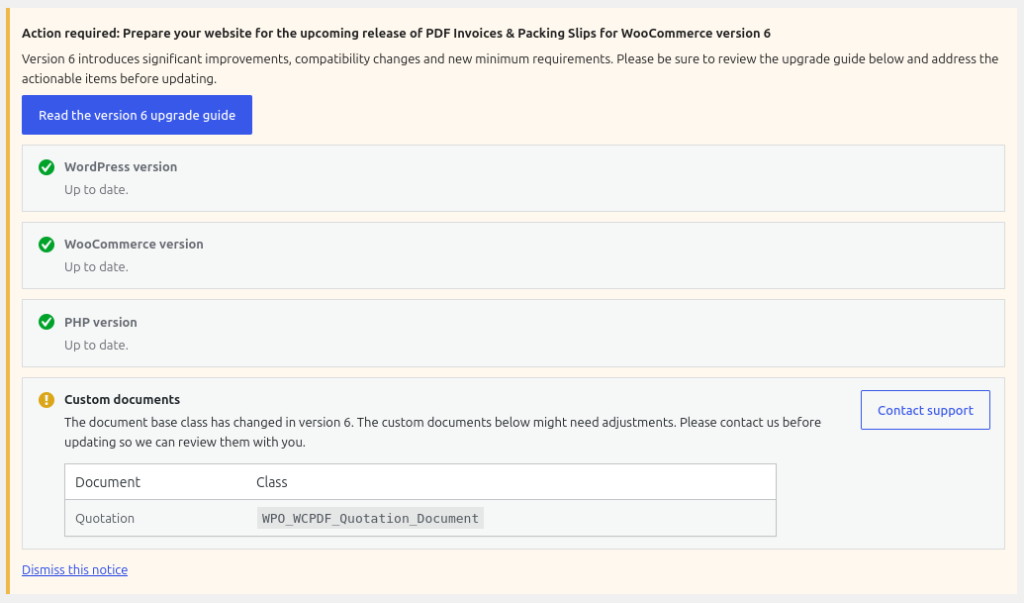
Once the known requirements have been addressed, the plugin will confirm that your store is ready for version 6.

Updating WordPress and WooCommerce #
If the notice shows that WordPress or WooCommerce needs to be updated, contact your website administrator or technical team.
Updating WordPress or WooCommerce may also affect your theme and other plugins. We recommend creating a complete backup and asking your technical team to test major updates on a staging copy of the website whenever possible.
Although version 6 supports WordPress 5.3 and WooCommerce 4.0 or higher, using currently supported versions is strongly recommended.
Updating PHP #
Version 6 requires PHP 8.1 or higher.
PHP is usually managed by your hosting provider or server administrator. If your website is using PHP 8.0 or older, contact your hosting provider or technical team and ask them to update it.
Changing PHP can affect your entire website, not only PDF Invoices & Packing Slips for WooCommerce. Your technical team should confirm that your theme and other active plugins support the new PHP version.
See How to update your PHP version for more information.
What are custom documents? #
Custom documents are additional document types registered alongside the standard Invoice and Packing Slip.
Examples may include quotations, receipts, proforma invoices, order confirmations, delivery notes or documents created specifically for your store.
A custom document may have been added by:
- A third-party plugin that integrates with PDF Invoices & Packing Slips for WooCommerce
- A custom plugin developed for your website
- A PHP code snippet
- A must-use plugin
- Code added to your theme
- Our legacy Quotation Document extension
The presence of a custom document does not necessarily mean that it is incompatible. However, version 6 changes parts of the underlying document system, so the code providing the document may need to be updated.
Custom documents detected #
When a custom document is found, the compatibility notice will display its name and PHP class.
For example:
- Document: Quotation
- Class:
WPO_WCPDF_Quotation_Document
This information can help your technical team, the plugin developer or our support team identify where the document comes from.
If a custom document is detected, check whether the plugin providing it has an available version 6-compatible update.
If it comes from a third-party plugin, contact its developer. If it comes from custom code, a code snippet or a custom plugin, ask your technical team to review it.
Do not update the live store until the compatibility of the custom document has been confirmed.
Migrating from the legacy Quotation Document extension #
The legacy PDF Invoices & Packing Slips for WooCommerce – Quotation Document extension is not compatible with version 6.
This extension was originally provided as boilerplate for developers who wanted to create their own document types. Some websites may still use the original extension, while others may use a modified version based on it.
Users of the legacy extension must migrate to: PDF Invoices & Packing Slips for WooCommerce – Custom Document
The new extension replaces the legacy Quotation Document extension as the supported foundation for custom documents.
When version 6 is installed, the original legacy extension will be deactivated and cannot be activated again. Do not attempt to force it to remain active, as it may cause a fatal PHP error.
Installing the new extension may not automatically transfer modifications made to the old extension. A developer may need to migrate custom settings, numbering, email attachments, templates or other functionality.
Ask your technical team to complete and test the migration before updating the live website.
Free plugin users can ask for help through the WordPress.org support forum. Paying customers can contact us directly at support@wpovernight.com to request the new extension and receive migration support.
When contacting us, include the document name and PHP class displayed in the compatibility notice, and let us know whether you use the original legacy extension or a modified version.
Before updating #
Before installing version 6:
- Create a complete backup of your website and database.
- Resolve any WordPress, WooCommerce or PHP warnings shown in the compatibility notice.
- Update related extensions where compatible versions are available.
- Confirm that every detected custom document has been reviewed.
- Complete any required migration from the legacy Quotation Document extension.
- Ask your technical team to test the update on a staging site whenever possible.
Once the notice confirms that the known requirements have been met, you can proceed with the update.
After updating #
Confirm that the standard Invoice and Packing Slip can still be generated correctly.
If your store uses custom documents, ask your technical team to confirm that they can still be generated, downloaded and attached to the expected emails.
If a problem occurs, restore the previous backup or temporarily deactivate the plugin or custom code providing the affected document.
Getting support #
Users of the free plugin should use the WordPress.org support forum.
Paying customers can contact us directly at support@wpovernight.com.
Please include:
- Your WordPress, WooCommerce and PHP versions
- A screenshot of the compatibility notice
- The name and PHP class of each detected custom document
- The plugin or custom code providing the document, if known
- Any relevant error message
Do not publish passwords, customer information, licence keys or other sensitive information in the public support forum.


