Setup #
Requirements:
Note: While Polylang by itself allows for PDF translations, managing multilingual content efficiently is difficult without the Polylang for WooCommerce addon. This documentation focuses on the basics of our Polylang compatibility using both.
Document language setting #
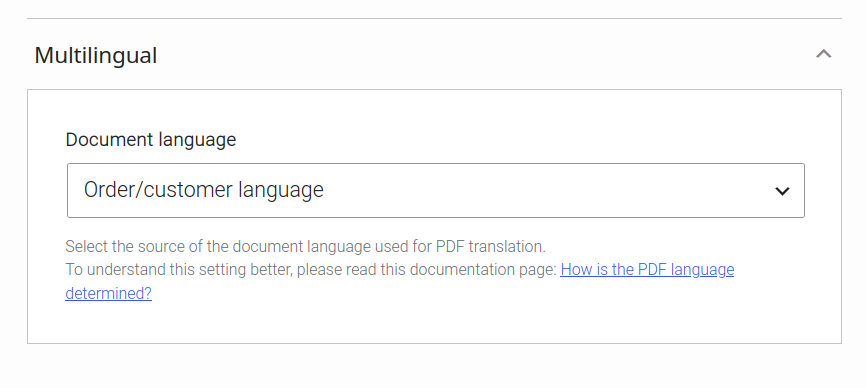
Path: WooCommerce > PDF Invoices > General > Multilingual > Document language.
It is highly recommended to leave the value of this setting at “Order/customer language“, otherwise translations will not work as expected.
See here for how to set the order language manually, when using Polylang.
Set order language manually #
Requires Polylang for WooCommerce.
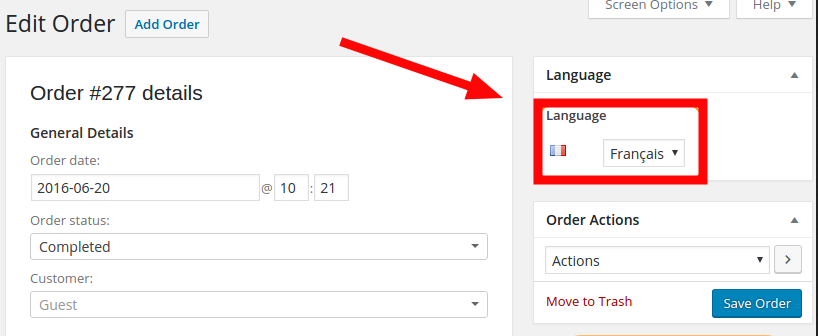
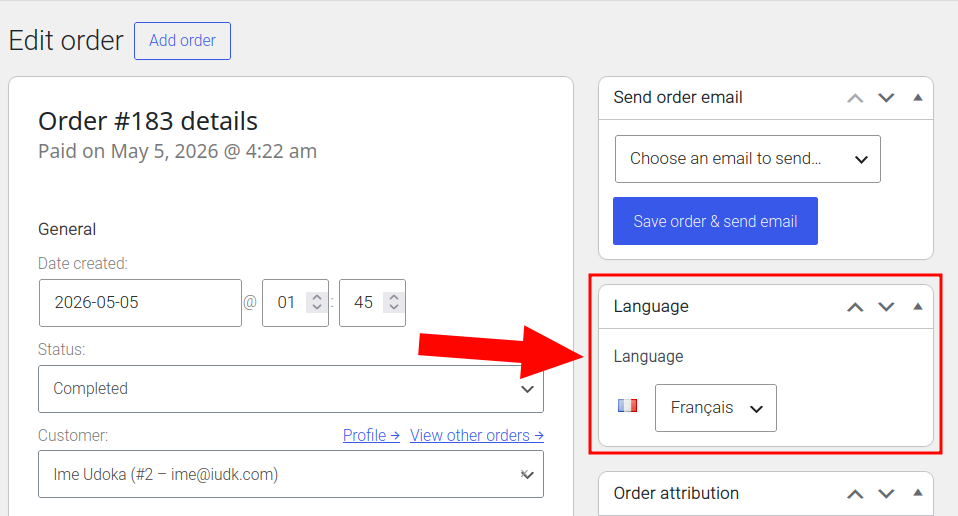
These listed plugins add the ability to set the order language with a click of a button, from the WooCommerce order details screen (WooCommerce > Orders, then select an order). The feature will be located in the Language section.
Multilingual settings #
All document settings are saved in the WooCommerce order meta. These multilingual settings keep existing even if Polylang is uninstalled.
See Settings compatible with multilingual plugins for a full list.
String translation #
User-entered strings #
These are strings that do not exist within the plugin files due to being entered into the site by a user.
These can be translated at Languages > Translations.
Plugin hardcoded strings #
These are strings that originate from plugin files.
it is recommended to use the free Loco Translate plugin.
WordPress strings #
These are strings that originate from WordPress core.
These can be translated at Languages > Translations.
Custom Block translation #
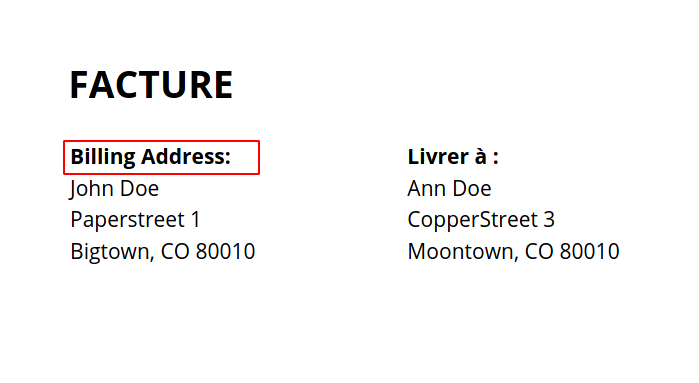
The user-entered text value in Custom Blocks can be translated by Polylang. The entered text in the custom block is:
<b>Billing Address: </b>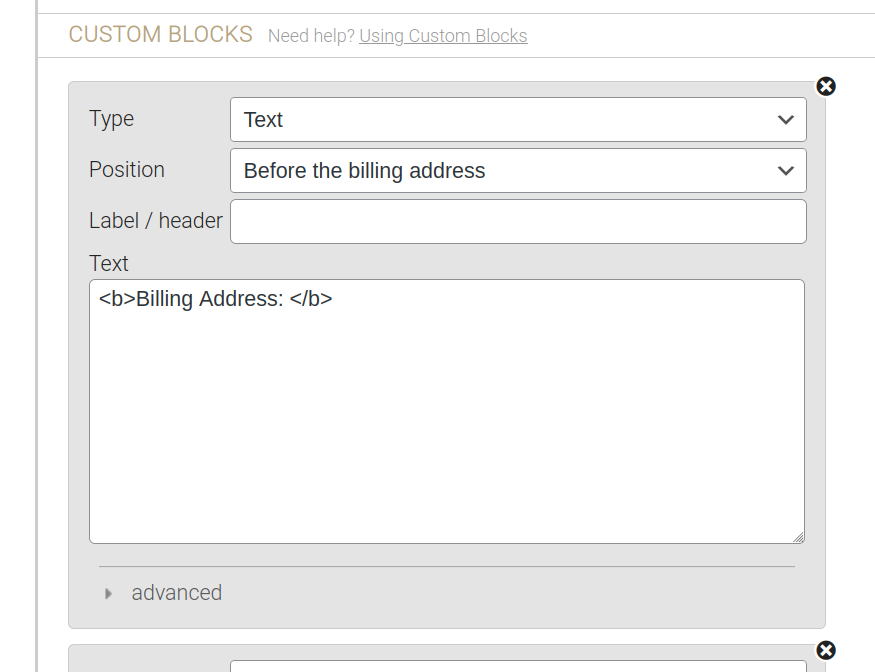
The image below shows the result of the custom block usage result on a PDF document section. The document language below is French, so we should expect our manually added text to be translated to French, not remain in English.
In order to translate these user-entered strings, they need to be searched via Polylang at Languages > Translations.
Once in Polylang’s ‘Translations‘ settings, search for the string (piece of text) you would like to translate.
In our example, our target language is French and we are to search for: <b>Billing Address: </b>.
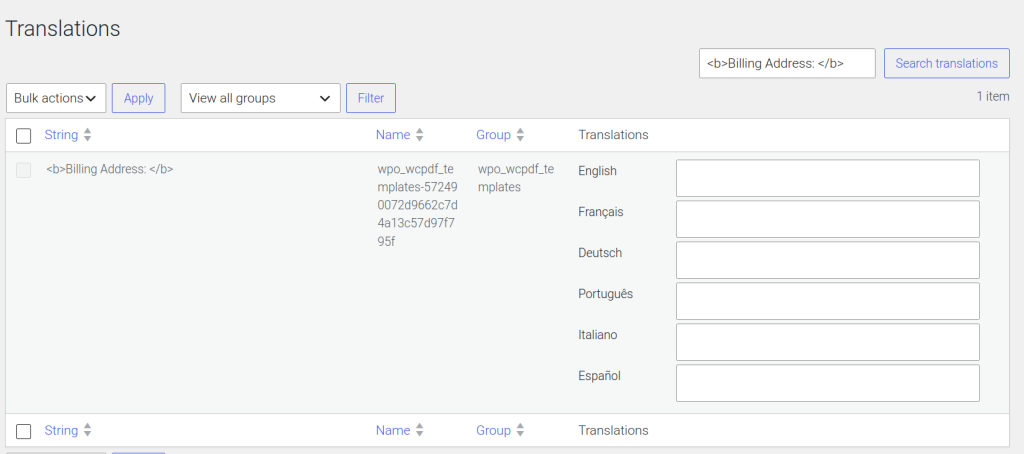
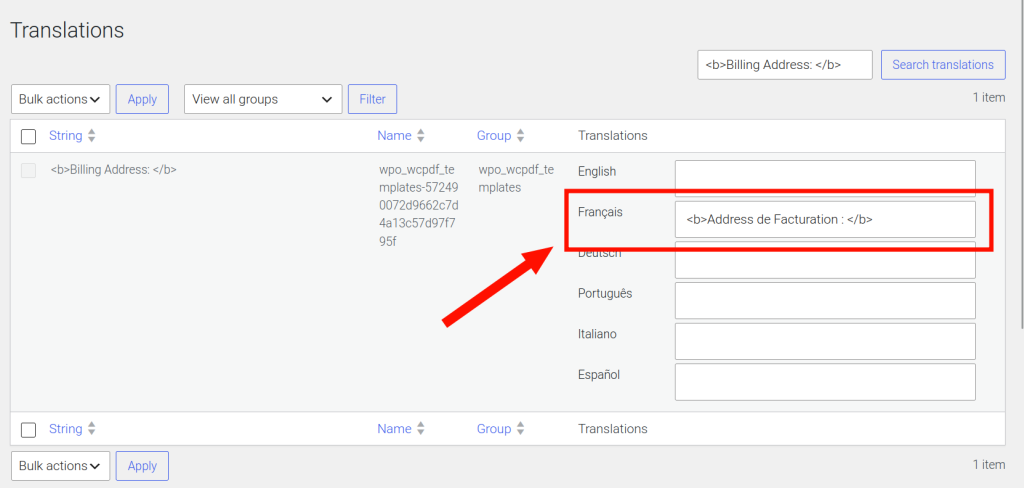
Notice that the search result has textboxes for each language. The desired translation for each language should be entered, then the changes saved. Below, <b>Addresse de facturation : </> was entered in the French textbox.
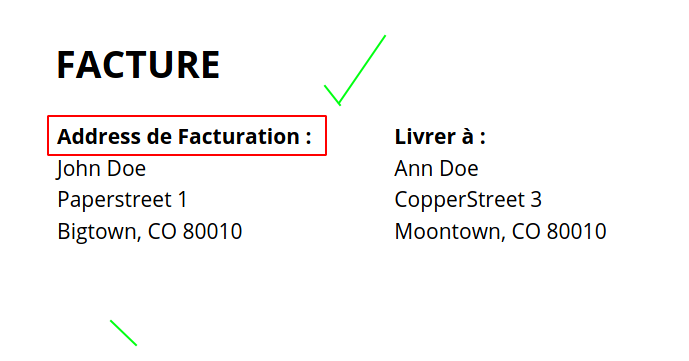
Here is the result on the same document:
Automatically translate product names and attributes #
Product names are not automatically translated because translating them could have legal implications in regards to the actual product being purchased, in some regions.
This means that a code snippet is needed to force the behavior you would like, where products are also translated.
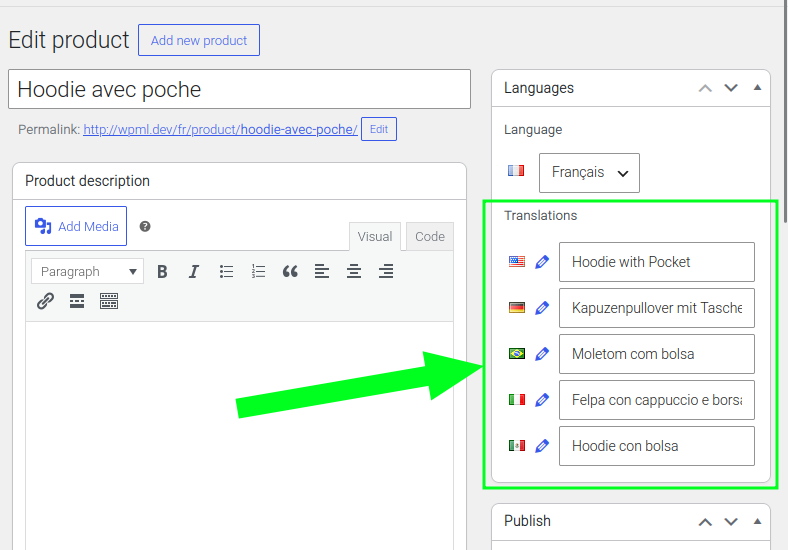
- First, this will require that the translations for the product name be provided via Polylang, at the Product-Edit screen:
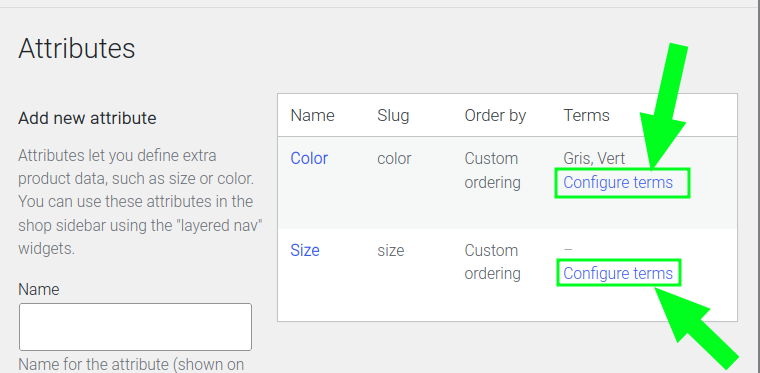
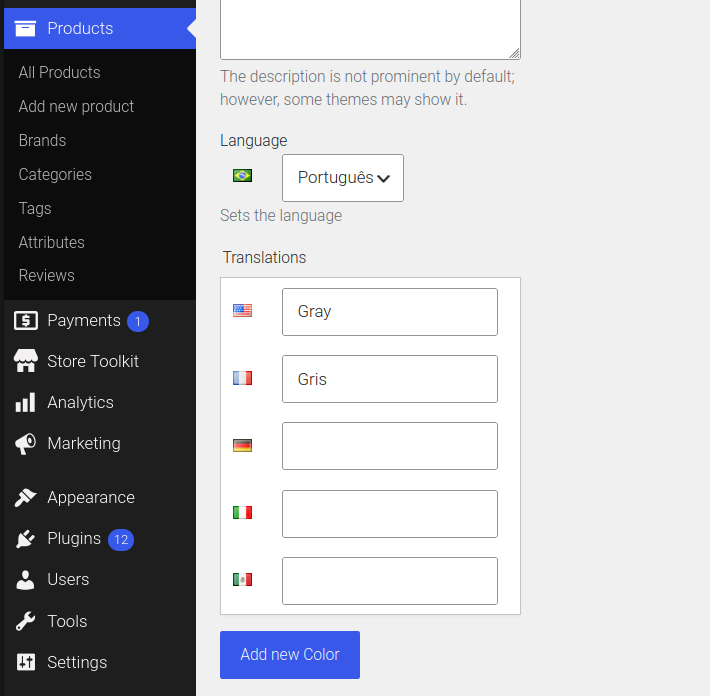
- Product attributes must also be translated in Polylang, at Products > Attributes, then click “Configure Terms” on an attribute.
- Remember to only change the document language by using polylang’s order language switcher at the order edit screen. Do not change the document language setting.
- Finally, use this code snippet to activate the automatic translation of product names and product attributes on your PDF documents.
add_filter( 'wpo_wcpdf_order_item_name', 'my_wcpdf_pll_product_name', 30, 3 );
  add_filter( 'wpo_wcpdf_templates_table_headers', 'my_wcpdf_pll_attribute_header', 30, 3 );
  add_filter( 'wpo_wcpdf_templates_item_column_data', 'my_wcpdf_pll_attribute_column', 30, 4 );

  function my_wcpdf_pll_product_name( $name, $item, $order ) {
  	if ( ! $item instanceof WC_Order_Item_Product ) {
  		return $name;
  	}

  	$lang = my_wcpdf_pll_pdf_lang();
  	if ( ! $lang || ! function_exists( 'pll_get_post' ) ) {
  		return $name;
  	}

  	foreach ( array_filter( array( $item->get_variation_id(), $item->get_product_id() ) ) as $product_id ) {
  		$translated_id = pll_get_post( $product_id, $lang );
  		if ( $translated_id ) {
  			$product = wc_get_product( $translated_id );
  			if ( $product ) {
  				return $product->get_name();
  			}
  		}
  	}

  	return $name;
  }

  function my_wcpdf_pll_attribute_header( $headers, $document_type, $document ) {
  	$lang = my_wcpdf_pll_pdf_lang();

  	foreach ( $headers as $key => $header ) {
  		if ( empty( $header['type'] ) || 'product_attribute' !== $header['type'] ) {
  			continue;
  		}

  		if ( ! empty( $header['label'] ) ) {
  			$headers[ $key ]['title'] = my_wcpdf_pll_translate_string( $header['label'], $lang );
  			continue;
  		}

  		if ( empty( $header['attribute_name'] ) ) {
  			continue;
  		}

  		$taxonomy = my_wcpdf_pll_attribute_taxonomy( $header['attribute_name'] );
  		if ( $taxonomy && taxonomy_exists( $taxonomy ) ) {
  			$headers[ $key ]['title'] = wc_attribute_label( $taxonomy );
  		}
  	}

  	return $headers;
  }

  function my_wcpdf_pll_attribute_column( $column, $column_setting, $item, $document ) {
  	if (
  		empty( $column_setting['type'] ) ||
  		'product_attribute' !== $column_setting['type'] ||
  		empty( $column_setting['attribute_name'] ) ||
  		empty( $item['item'] ) ||
  		! $item['item'] instanceof WC_Order_Item_Product
  	) {
  		return $column;
  	}

  	$lang     = my_wcpdf_pll_pdf_lang();
  	$taxonomy = my_wcpdf_pll_attribute_taxonomy( $column_setting['attribute_name'] );

  	if ( ! $lang || ! $taxonomy ) {
  		return $column;
  	}

  	// First choice: the actual attribute chosen on the order item.
  	$raw_value = $item['item']->get_meta( $taxonomy, true );

  	if ( '' === $raw_value ) {
  		$raw_value = $item['item']->get_meta( 'attribute_' . $taxonomy, true );
  	}

  	$value = my_wcpdf_pll_translate_attribute_value( $raw_value, $taxonomy, $lang );

  	// Fallback: read from the original ordered product/variation.
  	if ( '' === $value ) {
  		$original_product_id = $item['item']->get_variation_id() ?: $item['item']->get_product_id();
  		$original_product    = $original_product_id ? wc_get_product( $original_product_id ) : false;

  		if ( $original_product && taxonomy_exists( $taxonomy ) ) {
  			if ( $original_product->is_type( 'variation' ) ) {
  				$variation_attributes = $original_product->get_variation_attributes();
  				$raw_value            = $variation_attributes[ 'attribute_' . $taxonomy ] ?? '';
  				$value                = my_wcpdf_pll_translate_attribute_value( $raw_value, $taxonomy, $lang );
  			}

  			if ( '' === $value ) {
  				$terms = wc_get_product_terms( $original_product->get_id(), $taxonomy, array( 'fields' => 'all' ) );

  				if ( ! empty( $terms ) && ! is_wp_error( $terms ) ) {
  					$names = array();

  					foreach ( $terms as $term ) {
  						$names[] = my_wcpdf_pll_translate_term_name( $term, $taxonomy, $lang );
  					}

  					$value = implode( ', ', array_filter( $names ) );
  				}
  			}
  		}

  		if ( '' === $value && $original_product ) {
  			$value = $original_product->get_attribute( $taxonomy );

  			if ( '' === $value ) {
  				$value = $original_product->get_attribute( $column_setting['attribute_name'] );
  			}
  		}
  	}

  	if ( '' !== $value ) {
  		$column['data'] = nl2br( wptexturize( $value ) );
  	}

  	return $column;
  }

  function my_wcpdf_pll_translate_attribute_value( $raw_value, $taxonomy, $lang ) {
  	if ( '' === (string) $raw_value || ! taxonomy_exists( $taxonomy ) ) {
  		return '';
  	}

  	$parts = is_array( $raw_value )
  		? $raw_value
  		: array_map( 'trim', preg_split( '/\s*\|\s*|\s*,\s*/', (string) $raw_value ) );

  	$names = array();

  	foreach ( $parts as $part ) {
  		if ( '' === $part ) {
  			continue;
  		}

  		$term = get_term_by( 'slug', $part, $taxonomy );

  		if ( ! $term ) {
  			$term = get_term_by( 'name', $part, $taxonomy );
  		}

  		if ( $term && ! is_wp_error( $term ) ) {
  			$names[] = my_wcpdf_pll_translate_term_name( $term, $taxonomy, $lang );
  		}
  	}

  	return implode( ', ', array_filter( $names ) );
  }

  function my_wcpdf_pll_translate_term_name( $term, $taxonomy, $lang ) {
  	if ( function_exists( 'pll_get_term' ) ) {
  		$translated_id = pll_get_term( $term->term_id, $lang );

  		if ( $translated_id ) {
  			$translated_term = get_term( $translated_id, $taxonomy );

  			if ( $translated_term && ! is_wp_error( $translated_term ) ) {
  				return $translated_term->name;
  			}
  		}
  	}

  	return $term->name;
  }

  function my_wcpdf_pll_attribute_taxonomy( $attribute_name ) {
  	$attribute_name = preg_replace( '/^attribute_/', '', (string) $attribute_name );

  	if ( taxonomy_exists( $attribute_name ) ) {
  		return $attribute_name;
  	}

  	if ( 0 === strpos( $attribute_name, 'pa_' ) ) {
  		return $attribute_name;
  	}

  	$taxonomy = wc_attribute_taxonomy_name( $attribute_name );

  	return taxonomy_exists( $taxonomy ) ? $taxonomy : '';
  }

  function my_wcpdf_pll_translate_string( $text, $lang ) {
  	if ( ! is_string( $text ) || '' === $text || ! $lang || ! function_exists( 'pll_translate_string' ) ) {
  		return $text;
  	}

  	$translated = pll_translate_string( $text, $lang );

  	return is_string( $translated ) && '' !== $translated ? $translated : $text;
  }

  function my_wcpdf_pll_pdf_lang() {
  	if (
  		class_exists( '\WPO\WC\PDF_Invoices_Pro\Language_Switcher' ) &&
  		! empty( \WPO\WC\PDF_Invoices_Pro\Language_Switcher::$order_lang )
  	) {
  		return \WPO\WC\PDF_Invoices_Pro\Language_Switcher::$order_lang;
  	}

  	return function_exists( 'pll_current_language' ) ? pll_current_language( 'slug' ) : '';
  }
If you haven’t worked with code snippets (actions/filters) or functions.php before, read this guide: How to use code snippets. We also have a blog post here that you may find helpful about adding custom code to your site.
Troubleshooting #
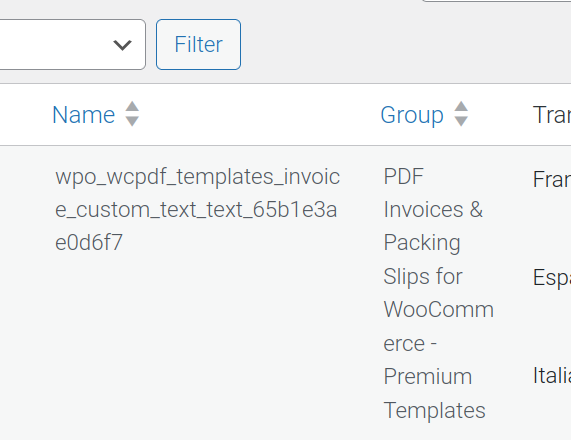
- When viewing search results from the Polylang translation settings at Languages > Translations, it is important to take note of both the Name and Group of the result. This is because it may appear as if some strings are duplicated, so the Group will help determine the string origin.