
“Email templates” are reusable reminder-email setups/configurations, not HTML/theme templates.
Register a template #
An email template defines a reusable reminder email, including its content, recipient settings and triggers. Register it after the plugin has initialized:
  function template_1_register_payment_reminder_template() {
      if (
          function_exists( 'WPO_WCSRE' ) === false ||
          isset( WPO_WCSRE()->email_templates ) === false
      ) {
          return;
      }

      $post_data = array(
          'post_title'   => 'Customer Payment Reminder',
          'post_content' => 'Hello, this is a payment reminder for your order.',
          'post_status'  => 'draft',
      );

      $meta_data = array(
          '_subject' => 'Payment Reminder',
          '_heading' => 'Payment Reminder',
          '_to'      => 'customer',
      );

      $triggers = array(
          array(
              'send' => array(
                  'title'                  => '1 Minute Reminder',
                  'time_type'              => 'relative',
                  'after_status_count'     => 1,
                  'after_status_time_unit' => 'minutes',
                  'after_status'           => array( 'wc-on-hold' ),
              ),
              'restrictions' => array(
                  'status' => array( 'all' ),
              ),
          ),
      );

      WPO_WCSRE()->email_templates->register_template(
          $post_data,
          $meta_data,
          $triggers
      );
  }

  add_action(
      'init',
      'template_1_register_payment_reminder_template',
      20
  );
Note: Registration does not create a reminder email immediately. It makes the template available so an email can later be generated from it.
Define custom scheduling options #
This defines what event/status schedules the reminder.
Given the code snippet above – to register a template – line 28 defines this at the `after_status` filter.
'after_status' => array( 'wc-on-hold' ),
This means that as it currently stands, only the ‘wc-on-hold’ status (“On-hold” status) is a scheduler.
To add another status as a trigger, the array value of ‘after_status’ should be changed:
Define restrictions #
This defines whether the order is still eligible when the reminder is checked/sent.
Given the code snippet above – to register a template – line 30 defines this at the `restrictions` filter.
'restrictions' => array(
                  'status' => array( 'all' ),
              ),
Create nonce protected URL from registered template #
function template_1_get_generation_url() {
      $template_key = sanitize_title( 'Customer Payment Reminder' );

      $url = add_query_arg(
          array(
              'post_type'         => 'wc_reminder_email',
              'generate_template' => $template_key,
          ),
          admin_url( 'edit.php' )
      );

      return wp_nonce_url(
          $url,
          'wpo_wcsre_generate_template'
      );
  }
Display clickable link in an admin notice #
This example will use an admin notice to create a clickable link. Clicking this link will create a reminder email, provided the function to create a URL (the previous snippet) is active, otherwise nothing happens.
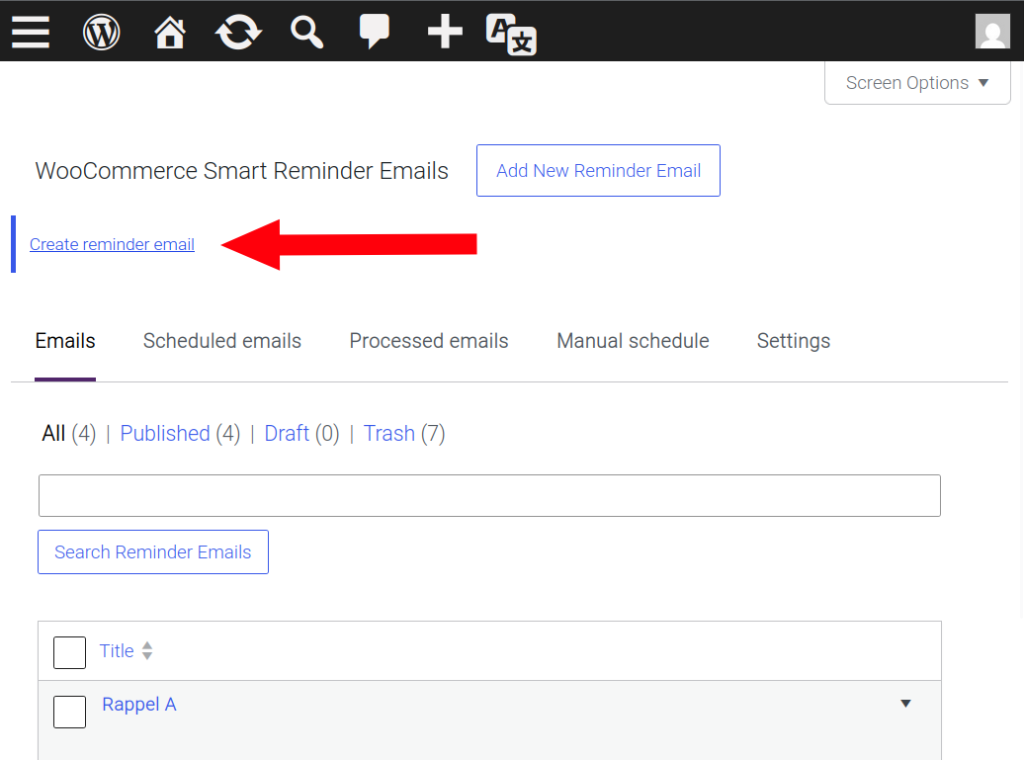
 function template_1_display_generation_link() {
      if (
          current_user_can( 'manage_woocommerce' ) === false ||
          function_exists( 'template_1_generation_url' ) === false
      ) {
          return;
      }

      $url = template_1_generation_url();

      if ( is_string( $url ) === false || $url === '' ) {
          return;
      }
      ?>
      <div class="notice notice-info">
          <p>
              <a href="<?php echo esc_url( $url ); ?>">
                  <?php esc_html_e( 'Create reminder email', 'wpo_wcsre' ); ?>
              </a>
          </p>
      </div>
      <?php
  }

  add_action( 'admin_notices', 'template_1_display_generation_link' );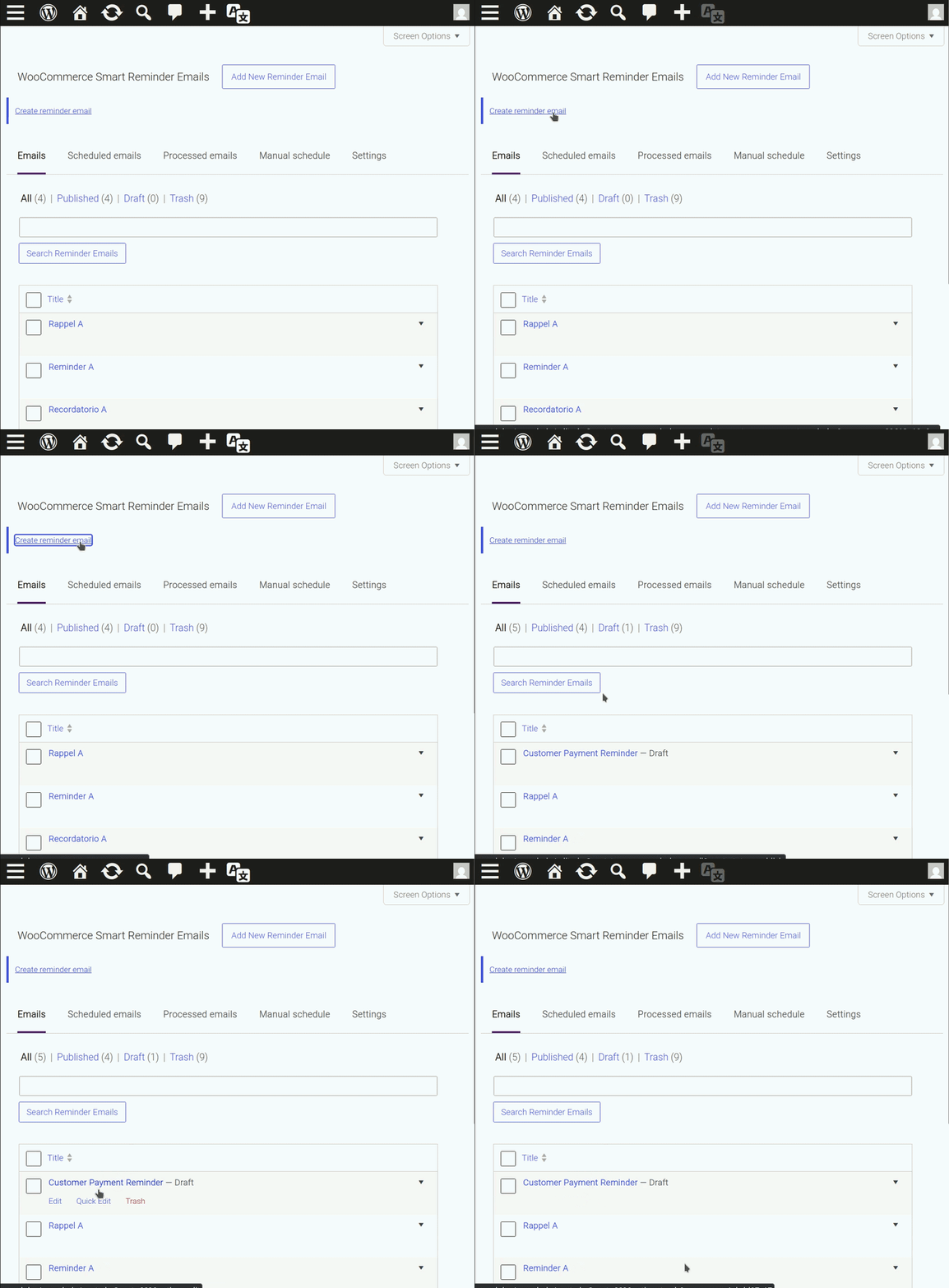
Create a reminder email from a registered template #
Once this code snippet is activated, a new reminder email in the list of reminder emails at WooCommerce > Reminder Emails. This only requires referencing a registered reminder email template.
function template_1_create_payment_reminder_once() {
      $option_name  = 'template_1_payment_reminder_created';
      $template_key = sanitize_title( 'Customer Payment Reminder' );

      if ( get_option( $option_name, '' ) === 'created' ) {
          return;
      }

      if ( isset( $templates[ $template_key ] ) === false ) {
          return;
      }

      WPO_WCSRE()->email_templates->create_email( $template_key );

      update_option( $option_name, 'created' );
  }

  add_action(
      'admin_init',
      'template_1_create_payment_reminder_once',
      20
  );


